
7 Devastating NPI Lookup Errors That Crush Your Claims and Revenue – Ultimate Fix Guide
Your National Provider Identifier (NPI) is the cornerstone of your medical billing identity. Every claim you submit, every electronic transaction you process, and every payer credentialing application you complete depends on an accurate NPI. Yet a single mistake in your NPI lookup—or a failure to perform an NPI lookup when one is needed—can trigger a cascade of denials, delayed payments, and compliance headaches. At Icon Billing LLC, we’ve seen practices lose tens of thousands of dollars because someone trusted an outdated NPI lookup result, used the wrong NPI type, or ignored red flags that a thorough NPI lookup would have caught.
This guide will walk you through seven devastating NPI lookup errors that crush claims and revenue. You’ll learn what a proper NPI lookup requires, how to avoid the most common pitfalls, and why partnering with a professional billing team like Icon Billing LLC is the ultimate safeguard for your revenue cycle. By the end, you’ll understand exactly how to use the NPI lookup process as a tool for clean claims, faster payments, and stronger compliance.
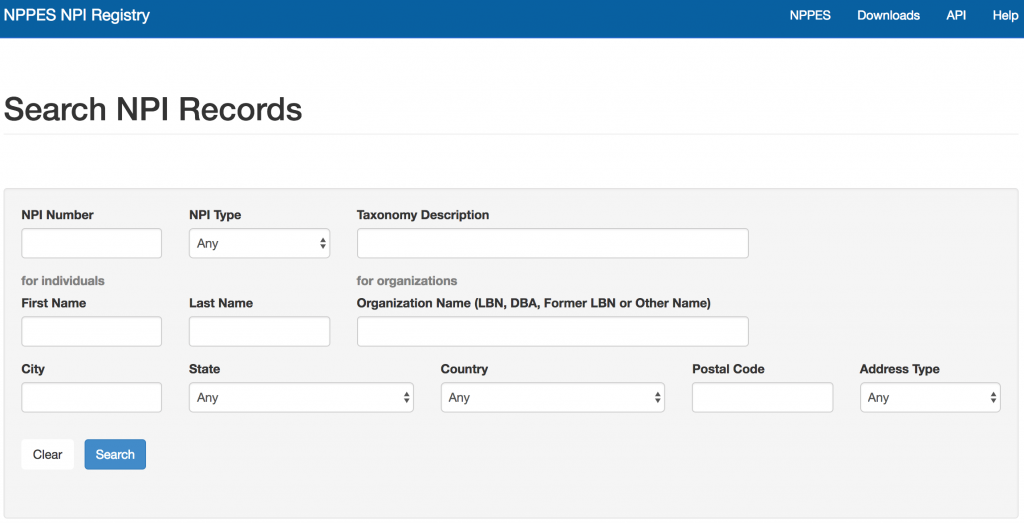
What Is an NPI Lookup and Why Does It Matter?
An NPI lookup is the process of searching for and verifying a healthcare provider’s National Provider Identifier through an authoritative database. The NPI is a unique 10-digit number assigned by the Centers for Medicare & Medicaid Services (CMS) to every covered healthcare provider, organization, and group practice. The NPI lookup is most commonly performed through the NPPES (National Plan and Provider Enumeration System) registry, which is the official CMS database containing NPI records and associated provider information.
A correct NPI lookup is essential because payers use the NPI to identify exactly who rendered a service, where it was performed, and under what tax identification number the claim should be paid. If your NPI lookup reveals an incorrect name, address, taxonomy code, or deactivation status, the claim will likely be denied or misrouted. The NPI lookup isn’t just for your own number—you must also perform an NPI lookup for referring physicians, ordering providers, and supervising physicians on certain claims. Getting the NPI lookup right is non-negotiable for a healthy revenue cycle.
Devastating Error #1: Relying on Outdated or Cached NPI Lookup Results
One of the most common NPI lookup mistakes is pulling information from an old screenshot, a stale spreadsheet, or a cached web page. NPI records change frequently—providers move, taxonomies are updated, and group affiliations shift. If your billing team performs an NPI lookup but uses a record that hasn’t been refreshed, the claim may be sent with outdated information. The result is a denial for mismatched demographics, a misdirected payment, or a rejected electronic submission.
Every NPI lookup should be performed live, at the moment the information is needed, directly from the official NPPES database. Don’t rely on memory, don’t trust a printout from six months ago, and don’t assume that because the number is correct, the associated data is also current. Icon Billing LLC integrates real-time NPI lookup verification into our claim scrubbing process, ensuring that every submission reflects the most current provider data available. An accurate, fresh NPI lookup is your first line of defense against avoidable denials.
Devastating Error #2: Confusing Individual (Type 1) and Organizational (Type 2) NPI Lookup Results
The NPI system distinguishes between Type 1 NPIs, which identify individual providers like physicians, nurse practitioners, and therapists, and Type 2 NPIs, which identify organizations such as group practices, hospitals, and billing entities. A disastrous NPI lookup error occurs when a biller pulls the wrong NPI type for a claim field. For example, billing a group practice’s Type 2 NPI in the rendering provider field—or using an individual’s Type 1 NPI in the billing provider field—can cause automatic claim rejection or payment misdirection.
A thorough NPI lookup should always verify both the NPI type and the exact purpose for which the number is being used. When you perform an NPI lookup, confirm whether the number corresponds to an individual or an organization, and ensure it matches the field you are populating on the claim form. Icon Billing LLC’s billing specialists are trained to perform precision NPI lookup checks for every claim, matching the correct NPI type to the correct claim segment. This eliminates one of the most frequent causes of payer rejections.
Devastating Error #3: Ignoring Taxonomy Codes During NPI Lookup
Your NPI lookup isn’t complete if you only retrieve the NPI number itself. Every NPI record includes one or more taxonomy codes that describe the provider’s specialty and service type. Payers use these taxonomy codes to determine whether a provider is eligible to bill for specific services. If the taxonomy code on file during your NPI lookup doesn’t match the service being billed—for example, a provider whose primary taxonomy is “Family Medicine” but who is billing for “Pain Management”—the claim may be denied as outside the provider’s credentialed scope.
A comprehensive NPI lookup should include a review of the primary taxonomy code and any secondary taxonomies listed. If the taxonomy is incorrect or outdated, the provider must update their NPPES record and may also need to re-credential with payers. Icon Billing LLC performs NPI lookup audits that catch taxonomy mismatches before claims are submitted, preventing denials that would otherwise take weeks to resolve. We also help providers update their NPI records so that future NPI lookup results reflect the correct specialties.
Devastating Error #4: Failing to Perform NPI Lookup for Referring and Ordering Providers
Many claims require more than just the billing and rendering provider NPIs. Claims for diagnostic tests, imaging, specialist referrals, and durable medical equipment often require the NPI lookup of the referring or ordering provider. If that NPI lookup is skipped or performed incorrectly, the claim will be denied. This is especially common in specialties like radiology, laboratory services, and DME, where the ordering provider’s NPI is a required field.
Your NPI lookup protocol should extend to every provider referenced on a claim. When you receive an order or referral, perform an NPI lookup immediately to verify that the referring physician’s NPI is active, correct, and matches the name and taxonomy on file. Icon Billing LLC includes referring and ordering provider NPI lookup verification in our pre-bill claim review, ensuring that every required NPI on the claim is accurate before submission. A complete NPI lookup saves your practice from the costly back-and-forth of denied referrals.
Devastating Error #5: Not Updating Your Own NPI Record Before an NPI Lookup Audit
Your own NPI record is only as good as the data you’ve entered into NPPES. If your practice moved to a new location, changed its legal name, added a new provider, or shifted its tax identification number, those changes must be reflected in the NPPES system. When a payer performs an NPI lookup on your organization and finds outdated information, they may suspend payments, require re-credentialing, or reject claims outright. Even if your internal billing is correct, a payer-side NPI lookup that returns stale data will cause problems.
Before you submit claims, perform an NPI lookup on yourself to ensure the record is current. Check the legal business name, physical address, mailing address, taxonomy code, and license information. If changes are needed, update NPPES immediately and propagate the updates to all your contracted payers. Icon Billing LLC performs regular NPI lookup maintenance for our clients, verifying that their NPPES records are accurate and aligned with their credentialing profiles. A clean NPI lookup result on your own record is the foundation of smooth claim processing.
Devastating Error #6: Using Third-Party NPI Lookup Tools That Pull Incomplete Data
While the official NPPES database is the authoritative source for NPI lookup, many practices use third-party tools or clearinghouse interfaces that may pull incomplete or cached data. These tools can be convenient, but they sometimes fail to show deactivation dates, multiple taxonomy codes, or recent address changes. A NPI lookup performed through an unreliable source can produce a false sense of security—the number looks right, but the underlying data is flawed.
When accuracy matters, your NPI lookup should be conducted through official CMS sources or a tightly integrated clearinghouse that syncs with NPPES in real time. At Icon Billing LLC, we use reliable, current NPI lookup resources that reflect the latest CMS records. We cross-reference NPI lookup results with payer directories when necessary, because some payers maintain their own provider enrollment databases that may differ from NPPES. A layered NPI lookup approach catches discrepancies that a single-source NPI lookup might miss.
Devastating Error #7: Neglecting NPI Lookup During the Credentialing and Re-Credentialing Process
Credentialing is the process by which payers verify a provider’s qualifications and enroll them in their network. A thorough NPI lookup is an essential part of both initial credentialing and re-credentialing. If your NPI lookup during credentialing reveals an inactive NPI, a mismatch between your NPI and your tax ID, or a discrepancy between your NPI record and your state license, the credentialing application will be delayed or denied. Delayed credentialing means delayed revenue—every day a provider is not credentialed is a day they cannot bill for services.
Before submitting any credentialing application, perform a full NPI lookup and resolve any discrepancies. Verify that the NPI is active, the legal name matches your tax records, the address is current, and the taxonomy codes align with your practice area. Icon Billing LLC manages both NPI lookup verification and the entire credentialing process for our clients. We ensure that your NPI record is clean before it reaches the payer’s credentialing desk, accelerating approvals and protecting your revenue timeline.
How to Perform a Proper NPI Lookup: Step by Step
To help you avoid these devastating errors, here is the professional NPI lookup process Icon Billing LLC follows:
-
Go to the Official NPPES Registry. The authoritative NPI lookup is available at https://npiregistry.cms.hhs.gov/. Use this site for all official NPI lookup queries.
-
Search by Name, NPI, or Organization. Enter the provider’s name or NPI number. For organizations, use the legal business name as registered with the IRS.
-
Review the Full Record. A proper NPI lookup includes reviewing the full record: NPI type, taxonomy codes, address, phone number, and enumeration date.
-
Verify Active Status. Confirm that the NPI is active and not deactivated. Deactivated NPIs must be reactivated through NPPES before billing.
-
Check Taxonomy Codes. Ensure the primary taxonomy matches the provider’s specialty and the service being billed.
-
Cross-Reference with Payer Directories. Some payers maintain separate directories. A NPI lookup in NPPES should be supplemented with a payer-specific NPI lookup to ensure consistency.
-
Document the NPI Lookup. Record the date, time, and result of your NPI lookup for compliance and audit purposes.
This NPI lookup protocol ensures that every claim you submit is built on verified, current data. Icon Billing LLC executes this process daily for our clients, making the NPI lookup a seamless part of our revenue cycle management.
The Connection Between NPI-Lookup and Clean Claims
A clean claim is one that passes payer edits on the first submission. The NPI-lookup is directly linked to clean claim rates because NPI errors are among the most common reasons for claim rejection. Every time a claim is rejected, the claim must be corrected and resubmitted, adding days or weeks to the payment cycle. Some rejections lead to denials that require appeals, consuming even more time and resources. By performing accurate NPI-lookup checks before submission, you stop these problems at the source.
Icon Billing LLC’s pre-bill claim scrub includes NPI-lookup verification for every provider on the claim. We confirm that billing, rendering, referring, and ordering provider NPIs are all present, active, and correctly matched to the claim fields. This disciplined NPI-lookup process has helped our clients achieve industry-leading clean claim rates, translating directly into faster payments and healthier cash flow.
Real-World Consequences of NPI-Lookup Failures
Consider these composite examples from cases we’ve encountered:
Scenario 1: A multi-provider practice hired a new physician and began billing under her NPI without performing a thorough NPI-lookup. Unknown to the billing staff, the physician’s NPI record still listed her previous out-of-state address and an outdated taxonomy. Claims submitted under her NPI were denied for demographic mismatches. The practice lost six weeks of revenue before Icon Billing LLC identified the root cause through a detailed NPI-lookup and corrected the NPPES record.
Scenario 2: A diagnostic imaging center received orders from a referring physician whose NPI had been deactivated after a retirement. The center’s billers skipped the NPIlookup for the referring provider and submitted claims with the old number. Every claim was denied. The NPI-lookup eventually revealed the deactivation, and the center had to contact the referring physician’s successor and resubmit all claims.
Scenario 3: A billing company used a third-party NPI-lookup tool that pulled cached data. The tool showed an NPI as active when it had actually been deactivated months earlier. Claims were submitted with the deactivated NPI, triggering a cascade of denials that took months to untangle.
In each case, a rigorous NPI-lookup process would have prevented the revenue loss. Icon Billing LLC exists to ensure that your practice never suffers from these preventable failures.
NPI-Lookup for New Providers and Practices
If you’re onboarding a new provider or establishing a new practice, the NPI-lookup process should begin well before the first claim is submitted. New providers must have their NPI issued through NPPES, and the number must then be linked to the practice’s tax identification number and payer enrollment. An early NPI-lookup confirms that the provider’s record is active and correct. Any errors—wrong name spelling, incorrect taxonomy, missing license information—should be fixed before credentialing begins.
Icon Billing LLC provides new provider onboarding that includes NPI-lookup verification, NPPES enrollment, and payer credentialing coordination. We ensure that your new provider’s NPI-lookup record is clean from day one, so there are no surprises when the first claims go out.
Frequently Asked Questions About NPI-Lookup
Q: Is the NPI-lookup free?
A: Yes, the official NPI-lookup through the NPPES registry is free. You should never pay for a basic NPI-lookup through a third-party site.
Q: How often should I perform an NPI-lookup?
A: You should perform an NPI-lookup whenever you submit a claim for a new provider, when a provider’s information changes, or when you receive a denial related to provider identity. A regular monthly NPI-lookup audit is also recommended.
Q: Can I update my NPI record online?
A: Yes, providers can update their NPI record through the NPPES portal. Changes may take up to 30 days to propagate through payer systems, so perform an NPI-lookup after any update to confirm the change has taken effect.
Q: What if my NPI-lookup reveals a deactivated NPI?
A: A deactivated NPI must be reactivated through NPPES. Contact Icon Billing LLC for assistance with reactivation and ensuring your claims are not interrupted.
Q: Does an NPI-lookup show my tax ID?
A: An NPI-lookup in NPPES does not publicly display your tax identification number. However, payers use their internal NPI-lookup systems to verify the linkage between your NPI and tax ID. Ensure both are correct in your payer enrollment files.

Proactive Steps You Can Take Today
-
Perform an NPI-lookup on your own NPI right now. Confirm the name, address, taxonomy, and active status. If anything is wrong, begin the correction process immediately.
-
Audit your most recent denials to identify any that may be related to NPI errors. A quick NPI-lookup on the providers involved can reveal the issue.
-
Build an NPI-lookup checklist for your billing team that includes verification of NPI type, taxonomy, and active status.
-
Contact Icon Billing LLC for a comprehensive NPI-lookup audit and clean claims assessment. We’ll identify vulnerabilities and fix them before they cost you more money.
Conclusion: Master Your NPI-Lookup for a Stronger Revenue Cycle
The NPI-lookup is not a tedious administrative formality—it’s a critical revenue protection tool. The seven devastating errors—relying on stale data, confusing NPI types, ignoring taxonomies, skipping referring provider checks, neglecting your own record, using unreliable third-party tools, and overlooking credentialing integration—are all avoidable with discipline and expertise. A proper NPI-lookup ensures that every claim you submit carries accurate, current, and complete provider information, maximizing the likelihood of first-pass payment.
Icon Billing LLC has built its reputation on precision and results. Our team integrates rigorous NPI-lookup verification into every stage of your revenue cycle, from credentialing to claim submission to denial management. We don’t just find errors—we prevent them. Don’t let a flawed NPI-lookup crush your claims and drain your revenue. Contact Icon Billing LLC today for a free consultation. Together, we’ll transform your NPI-lookup process into a pillar of clean claims, faster payments, and financial peace of mind. Your practice deserves nothing less than billing excellence, and it starts with a single, accurate NPI-lookup.