Introduction
Navigating the world of medical billing requires precision, patience, and the right tools. One essential tool for medical professionals and billing specialists is the Pecos login portal, which allows providers to enroll in Medicare, update practice information, and verify eligibility. Whether you’re a seasoned medical biller or just starting, understanding pecos login is crucial for ensuring smooth workflows and avoiding errors that can delay reimbursements.
In this guide, we will cover everything you need to know about pecos login — from step-by-step instructions and troubleshooting tips to common mistakes and how to avoid them. By the end, you’ll be equipped to navigate PECOS confidently and efficiently.
What is Pecos Login and Why It Matters
The pecos login is your gateway to the Provider Enrollment, Chain, and Ownership System (PECOS), a secure online portal managed by the Centers for Medicare & Medicaid Services (CMS). Using PECOS, providers can:
- Submit initial Medicare enrollment applications
- Update practice or provider information
- Track enrollment status
- Verify provider credentials and affiliations
For medical billing professionals, mastering the pecos login process ensures compliance, reduces claim denials, and streamlines revenue cycle management. A smooth login experience is essential, as even minor mistakes can result in delayed payments or rejected claims.
Step-by-Step Guide to Pecos Login
Accessing PECOS for the first time can seem daunting. Here’s a simple, stepwise approach for a successful pecos login:
- Visit the Official PECOS Website: Navigate to https://pecos.cms.hhs.gov.
- Select “Login” or “Create an Account”: New users need to register, while returning users can proceed to pecos login.
- Enter Your User ID and Password: Ensure your credentials are correct. Multiple failed attempts can temporarily lock your account.
- Security Verification: PECOS may require authentication via email or phone.
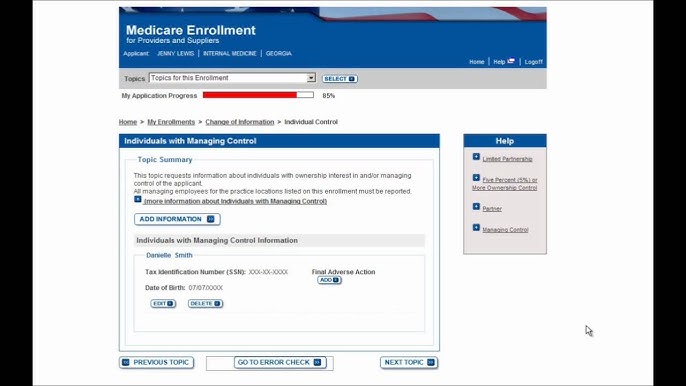
- Access the Dashboard: Once logged in, you can view enrollment status, submit updates, or review applications.
Pro tip: Always bookmark the PECOS login page to avoid phishing scams.
Common Pecos Login Issues and How to Fix Them
Even experienced users encounter problems with pecos login. The most common issues include:
- Incorrect Username or Password: Double-check credentials and use password recovery if needed.
- Browser Compatibility: PECOS works best on updated browsers like Chrome or Firefox.
- Account Lockouts: Multiple failed attempts trigger temporary lockouts. Contact CMS support if needed.
- Two-Factor Authentication Failures: Ensure your phone or email for verification is accessible.
Addressing these problems promptly ensures uninterrupted access to PECOS and avoids billing delays.
Best Practices for a Secure Pecos Login
Security is critical in medical billing. Following best practices helps maintain account safety and HIPAA compliance:
- Use strong, unique passwords and update them regularly.
- Never share PECOS login credentials with unauthorized personnel.
- Enable multi-factor authentication.
- Log out immediately after completing tasks.
- Avoid logging in on public or unsecured networks.
By following these precautions, your pecos login sessions remain secure, and sensitive patient data is protected.
Benefits of Using Pecos Login for Medical Billing
A properly managed pecos login can streamline operations in several ways:
- Faster Enrollment Updates: Changes to provider or practice information are reflected quickly.
- Reduced Claim Denials: Accurate PECOS information ensures claims are processed correctly.
- Improved Compliance: Staying updated in PECOS helps meet CMS requirements.
- Time-Saving: Direct access eliminates paperwork and reduces administrative workload.
Medical billing professionals who optimize pecos-login usage can focus more on revenue cycle management and less on administrative bottlenecks.
PECOS Login FAQ Section
How do I reset my Pecos-login password?
You can reset your password directly on the PECOS-login page using the “Forgot Password” option. A verification email or phone code will guide you through the process.
Why is my Pecos-login account locked?
Multiple failed login attempts or security concerns can temporarily lock your account. Contact CMS PECOS support to regain access.
Can I access Pecos-login on mobile devices?
Yes, PECOS is accessible on mobile devices, but it’s recommended to use an updated browser for optimal performance.
What information do I need to register for Pecos-login?
You will need your NPI, tax ID, and practice information. Ensure accuracy to prevent delays in enrollment.
Is Pecos-login free to use?
Yes, PECOS-login is free for providers and billing professionals. Avoid third-party sites that charge fees.
How often should I check Pecos-login for updates?
Regularly checking PECOS ensures your provider information is accurate, minimizing billing errors.
Conclusion
Mastering the pecos-login process is vital for medical billing efficiency and compliance. By understanding how to access PECOS, troubleshoot common issues, and follow security best practices, providers and billing professionals can streamline their operations, reduce claim errors, and maintain CMS compliance.
Whether you are just starting or looking to improve your workflow, these insights will help you use PECOS confidently. Bookmark this guide for quick reference and make pecos-login a seamless part of your daily billing operations.