7 Deadly PECOS Login Mistakes That Destroy Your Medicare Enrollment – Ultimate Fix Guide
For any medical practice, durable medical equipment supplier, or home health agency, Medicare enrollment is the gateway to serving a huge patient population and sustaining cash flow. At the heart of that enrollment lies a system you cannot afford to underestimate: PECOS login. The Provider Enrollment, Chain, and Ownership System (PECOS) is the digital portal through which you submit and manage Medicare enrollment applications, update practice information, and revalidate your billing privileges. Yet a single misstep during a PECOS login or within the PECOS login process can stall your application for months, trigger costly denials, or even revoke your Medicare billing rights. At Icon Billing LLC, we’ve witnessed too many practices blindsided by preventable PECOS login errors—and we’ve helped them recover. This guide reveals seven deadly PECOS login mistakes, explains exactly how to avoid them, and shows you how a seamless PECOS login strategy protects your revenue.
Whether you’re a new provider seeking initial enrollment or a seasoned practice facing revalidation, your PECOS login is the first critical step. A flawless PECOS login ensures you can submit the correct forms, track your application, and upload supporting documentation without interruption. But the PECOS login process can be confusing, especially with CMS security requirements, identity verification through ID.me, and the need to associate your PECOS login with the correct NPI and tax identification. The consequences of a mishandled PECOS login aren’t theoretical—they hit your bank account directly. Denied claims, lapsed billing privileges, and laborious appeals all trace back to problems that start at the PECOS login screen. Icon Billing LLC’s enrollment specialists live inside PECOS daily, and we’ve distilled the most devastating PECOS login pitfalls into this action-oriented guide.
Why a Proper PECOS Login Matters So Much
Your PECOS login is the key that unlocks the Medicare enrollment ecosystem. Through a secure PECOS login, you can:
-
Submit initial Medicare enrollment applications (CMS-855 forms)
-
Revalidate existing enrollments to keep billing active
-
Update practice addresses, ownership changes, and banking details for electronic funds transfer
-
Report adverse legal actions or practice changes
-
Check the status of pending applications
-
Manage reassignment of benefits and supervision arrangements
Every one of those actions is tied to your PECOS login identity. If your PECOS login credentials are locked, lost, or not properly set up with the correct user role, you’re locked out of the system entirely. That means you can’t meet revalidation deadlines, can’t add a new provider, and can’t fix a denied application. The result? Medicare stops paying claims tied to your billing number. For many practices, Medicare represents 30–50% of revenue. A PECOS login failure isn’t just an inconvenience; it’s a direct financial threat. Understanding the PECOS login process deeply—and knowing the mistakes to avoid—is one of the highest-return investments you can make in your revenue cycle.
Deadly Mistake #1: Using an Outdated or Unsupported Browser for PECOS Login
It sounds trivial, but a shocking number of PECOS login failures trace back to browser incompatibility. PECOS is a government system with specific technical requirements. Attempting a PECOS login using an outdated version of Internet Explorer, a browser with aggressive pop-up blockers, or a mobile device not fully supported can result in endless loading screens, cryptic error messages, and session timeouts. Staff then panic, click “back,” refresh repeatedly, and sometimes lock the account by exceeding the allowed number of failed PECOS login attempts.
Before your next PECOS login, verify that you are using a CMS-compatible browser—typically recent versions of Chrome, Edge, or Firefox with JavaScript enabled and pop-ups allowed for the cms.gov domain. Clear your cache and cookies periodically, because a corrupted cache can derail a PECOS login even on a supported browser. At Icon Billing LLC, we preconfigure our enrollment workstations to avoid these technical hurdles, ensuring every PECOS login session starts cleanly. Don’t let a browser issue be the reason your revalidation deadline passes while you’re stuck on a spinning PECOS login screen.
Deadly Mistake #2: Mishandling the ID.me Identity Verification
In response to rising cybersecurity threats, CMS now requires users to verify their identity through ID.me before completing a PECOS login. This multi-factor authentication process involves uploading identity documents and a facial recognition scan. A common PECOS login horror story: a provider or office manager attempts the ID.me setup, uses a personal email instead of a professional one, or fails to properly link the verified identity to the correct PECOS login account. The result is a fragmented identity profile that blocks the PECOS login entirely.
To succeed with your PECOS login, create an ID.me account using an email that matches your CMS-registered contact information. Follow the verification steps meticulously, and do not attempt a second PECOS login identity if the first one stalls—contact ID.me support or let an expert intervene. Icon Billing LLC guides practices through the ID.me and PECOS login pairing, ensuring your verified identity unlocks the right PECOS profile the first time. Without a clean identity link, your PECOS login will fail, and you’ll be unable to manage any enrollment tasks.
Deadly Mistake #3: Confusing Individual and Organizational PECOS Login Roles
PECOS has multiple user roles: Individual Authorized Official, Access Manager, and ordinary user. A deadly mistake occurs when the person performing the PECOS login does not have the correct role to approve applications, sign attestations, or submit changes. For example, an office manager may have a PECOS login that allows them to start an application, but only the Authorized Official can sign and submit. If that manager attempts a PECOS login and sees a “Submit” button grayed out, panic ensues, and the revalidation sits in limbo.
Understand exactly which role your PECOS login holds. The Authorized Official is a person with the legal authority to bind the organization—typically an owner, partner, or corporate officer. That person’s PECOS login is required for final submission. If the Authorized Official doesn’t have their own PECOS login set up yet, don’t wait until the deadline. Icon Billing LLC helps practices map out who needs a PECOS login, at what permission level, and we coordinate the entire setup so that when it’s time to sign, the right PECOS login is ready and functioning.
Deadly Mistake #4: Ignoring or Deleting PECOS Login Correspondence
CMS communicates critical enrollment and revalidation deadlines through your PECOS dashboard and via email linked to the PECOS login account. A deadly pattern we see: a staff member performs a PECOS login, sees a notification about an upcoming revalidation due date, assumes someone else will handle it, and logs out. The email notification from that PECOS login alert gets buried in a cluttered inbox. Six months later, Medicare billing stops abruptly, and the practice discovers their enrollment was deactivated because nobody acted after that PECOS login notification.
Every PECOS login session should include a systematic review of your message inbox, application status dashboard, and any pending development letters. Set up a protocol: after each PECOS login, document the status, note any deadlines, and assign a responsible person with a calendar entry. Better still, let Icon Billing LLC manage your PECOS login dashboard for you. We perform regular PECOS login checkups, track all deadlines, and respond to correspondence immediately. Your PECOS login should be a source of clarity, not a forgotten chore.
Deadly Mistake #5: Failing to Keep PECOS Login Information Secure
The PECOS login credentials—username, password, and ID.me account—hold the keys to your Medicare enrollment. When a staff member with the PECOS login leaves the practice, and you don’t update the credentials or revoke their access, you create a massive security and compliance risk. A disgruntled former employee could perform a malicious PECOS login and alter your banking information or submit false changes. Even without bad intent, orphaned PECOS login accounts mean no one remaining in the practice knows how to perform a PECOS login when it’s urgently needed.
Centralize control of your PECOS login credentials. Use a secure password manager, document recovery options, and associate the PECOS login with a generic practice email that multiple authorized personnel can access. When anyone with PECOS login knowledge departs, immediately change the password and revalidate ID.me settings. At Icon Billing LLC, we act as a stable, secure custodian of your enrollment processes. While you retain ultimate legal authority, our team’s disciplined PECOS login management ensures continuity no matter what personnel changes you face.
Deadly Mistake #6: Entering Inconsistent Information After PECOS Login
Once you’ve completed a successful PECOS-login, the data you enter must match what’s on file with the IRS, NPPES, and your state licensing board. A mismatch between the Legal Business Name in PECOS and the name on your tax ID letter will cause a rejection. A Social Security Number or Date of Birth error for an individual provider triggers an immediate hold. Every piece of information you input after your PECOS-login must be triple-checked against the original source documents.
Too many practices rush through the application after a PECOS-login, copying information from memory rather than verifying against the legal entity documents. The rejection letter that comes weeks later forces a do-over—and in the meantime, Medicare claims pile up unpaid. Icon Billing LLC’s specialists treat every post-PECOS-login data entry session as an audit. We cross-reference your NPPES record, IRS CP575 notice, state license, and malpractice insurance certificate before anything is submitted through the PECOS-login portal. This meticulousness eliminates the most common reason for enrollment delays: inconsistent data entered after a PECOS-login.
Deadly Mistake #7: Underestimating Revalidation Timelines
Medicare requires periodic revalidation of enrollment information—typically every five years, or more frequently if CMS requests it. The revalidation notice arrives in your dashboard after a PECOS-login, and you have a hard deadline to submit the revalidation application. The deadly mistake is underestimating how long it takes to prepare the required documents and assuming you can complete everything in a single PECOS-login session just before the deadline. Revalidation often requires updated licenses, proof of insurance, and recent financial documentation. If your PECOS-login reveals a revalidation request due in 30 days, start gathering documents immediately.
When a revalidation is missed, Medicare deactivates your billing privileges, and you must go through a full reactivation process—a nightmare that can take months. Avoid this by treating every PECOS-login as an opportunity to check revalidation status, even if you haven’t received an explicit email. Icon Billing LLC maintains a calendar of revalidation dates for all our clients. We perform a preemptive PECOS-login review several months before the due date, prepare the revalidation package, and submit it early. With us, a PECOS-login is never a last-minute scramble.
A Step-by-Step Guide to a Flawless PECOS-Login
Now that the mistakes are clear, let’s walk through the correct PECOS-login protocol.
-
Prepare Your Environment: Use a supported browser, disable pop-up blockers for cms.gov, and ensure a stable internet connection. This simple step prevents 90% of PECOS-login technical failures.
-
Complete ID.me Verification: Before your PECOS-login, set up or update your ID.me account with a professional email. Link it to the correct NPI and organization identity. Test your PECOS-login after ID.me setup to confirm access.
-
Use the Correct User Role: Ensure that the individual performing the PECOS-login has the appropriate role. For submissions, the Authorized Official’s PECOS-login is mandatory.
-
Gather All Documents Before Logging In: Have your IRS letter, NPI confirmation, state licenses, and banking details on hand before initiating the PECOS-login. You can upload PDFs directly in the session.
-
Log In and Navigate to the Right Module: After a successful PECOS-login, select the correct enrollment type (Initial, Revalidation, Change of Information). Read the on-screen instructions.
-
Complete the Application Methodically: Enter each field exactly as it appears on legal documents. Use the “Save” function often during a long PECOS-login session to prevent data loss.
-
Upload Supporting Documents in Accepted Formats: Attach clear, unaltered PDF scans. A PECOS-login upload with blurry documents will be rejected.
-
Review and Submit with Signature: The Authorized Official performs a final PECOS-login to sign and submit. Print or save the confirmation screen showing the tracking number.
Following this PECOS-login protocol transforms a stressful experience into a manageable, predictable process. Icon Billing LLC executes this exact sequence for every client enrollment, ensuring a clean PECOS-login and a successful submission every time.
How Icon Billing LLC Rescues Your PECOS-Login and Enrollment
Our enrollment specialists are more than just form-fillers; we’re your strategic partners in maintaining uninterrupted Medicare revenue. We start by auditing your current PECOS-login status for all providers and locations. We identify expired revalidations, pending applications, and role mismatches. Then we create a comprehensive PECOS-login management plan that includes:
-
Establishing and verifying the PECOS-login credentials for all Authorized Officials and Access Managers.
-
Handling ID.me verification so your PECOS-login is always accessible.
-
Monitoring your PECOS-login dashboard weekly for new correspondence, development requests, or revalidation triggers.
-
Preparing and uploading documents through PECOS-login with a quality-check process that eliminates data inconsistencies.
-
Tracking application progress and performing a follow-up PECOS-login to ensure timely approvals.
-
Updating your enrollment when you add a new provider, change a practice location, or modify ownership—all through a secure PECOS-login session.
When you delegate PECOS-login management to Icon Billing LLC, you free your staff from the anxiety of navigating a complex federal system. Your internal team can focus on patient care while we ensure your Medicare billing privileges never lapse. Your PECOS-login becomes our daily responsibility, not your weekend panic.
Real Scenarios: When a Botched PECOS-Login Cost Practices Thousands
Consider a cardiology group that ignored a revalidation notice buried in the dashboard after a casual PECOS-login check. Sixty days later, Medicare suspended their billing. They lost $200,000 in unpayable claims before Icon Billing LLC reactivated their enrollment through an emergency PECOS-login and manual intervention. Another solo practitioner attempted a PECOS-login to add a new office location but inorrectly selected “Change of Ownership” instead of “Change of Information,” triggering a deactivation of the original enrollment. Fixing that error required weeks of phone calls, a corrected PECOS-login submission, and a gap in Medicare revenue that directly impacted the provider’s livelihood.
In both cases, proper PECOS-login hygiene and expert oversight would have prevented the crisis. These aren’t rare anomalies; they’re the predictable result of treating PECOS-login as a simple password entry rather than a high-stakes portal to a heavily regulated enrollment process. Icon Billing LLC exists to make sure you never become one of these cautionary tales.

Protecting Your PECOS-Login in an Era of Increasing Cybersecurity Threats
CMS continuously tightens security around PECOS-login to protect provider data. Multifactor authentication, periodic password resets, and device recognition are now standard. While these measures are essential, they also increase the chances of a lockout. A failed PECOS-login attempt from an unrecognized device can trigger a temporary freeze. To stay ahead, register only trusted devices for your PECOS-login, keep recovery contact information current, and never share a PECOS-login session over unsecured remote access. If you work with a billing partner like Icon Billing LLC, ensure they access PECOS through compliant, secure channels. Our remote PECOS-login processes use encrypted connections and role-based access that CMS accepts, so your enrollment work moves forward without triggering security flags.
FAQs About PECOS-Login
Q: Can I share my PECOS-login with my billing staff?
A: Individual PECOS-login accounts should not be shared. CMS expects each user to have their own PECOS-login with permissions set appropriately. Sharing credentials violates security policies and can cause authentication errors. Icon Billing LLC helps set up separate PECOS-login accounts for each authorized user.
Q: What do I do if I’m locked out of my PECOS-login?
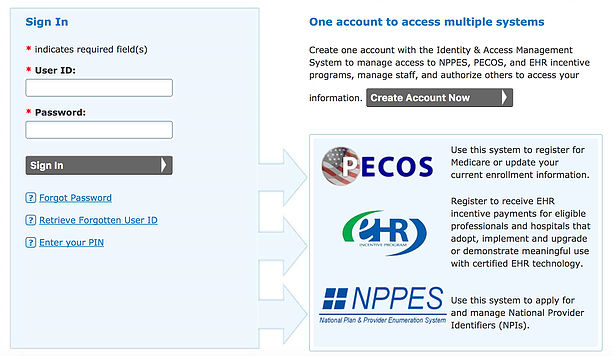
A: Use the “Forgot Password” link on the PECOS-login page or contact CMS External User Services for assistance. If the lockout is due to ID.me issues, you must resolve them with ID.me support. Icon Billing LLC can step in to troubleshoot your PECOS-login lockout and coordinate the recovery.
Q: How often should I perform a PECOS-login to check my enrollment status?
A: At a minimum, perform a PECOS-login monthly to review messages and dashboard status. During active revalidation or a pending application, weekly PECOS-login checks are recommended. Our service includes continuous monitoring, so you don’t have to remember.
Your PECOS-Login Is Your Revenue Lifeline
If there’s one message to take away, it’s this: your PECOS-login is not just a portal password; it is the gatekeeper of your Medicare revenue. Every PECOS-login session has the potential to protect or jeopardize your billing privileges. The seven deadly mistakes—browser issues, ID.me mismanagement, role confusion, ignored notifications, insecure access, data inconsistencies, and missed revalidation deadlines—are all avoidable with knowledge, discipline, and expert support.
Icon Billing LLC has built a reputation on safeguarding provider enrollments and maximizing reimbursements. We’ve turned countless PECOS-login horror stories into success stories. Now, we invite you to take control of your enrollment before a crisis hits. Contact us today for a complimentary enrollment audit. We’ll perform a secure PECOS-login on your behalf, assess your current status, identify any lurking deadlines, and propose a streamlined management plan. With Icon Billing LLC as your partner, your PECOS-login becomes a symbol of security, not a source of fear. Don’t let a deadly PECOS-login mistake destroy the Medicare revenue you’ve worked so hard to earn. Let’s lock in your billing future, one flawless PECOS-login at a time.