Blog Post: Unlocking Easy Access to CureMD Provider Login: A Complete Guide
In today’s fast-paced medical environment, healthcare providers need efficient and reliable solutions for managing patient information and billing details. One such solution is CureMD, a cloud-based electronic health record (EHR) and medical billing software that simplifies administrative tasks. For many healthcare professionals, CureMD provider login is the first step in accessing these essential tools. In this guide, we will walk you through the process of accessing your CureMD provider login, troubleshoot common issues, and explain the benefits of using the platform in conjunction with the services provided by Icon Billing LLC.
What is CureMD?
Before diving into the CureMD provider login process, it’s important to understand what CureMD offers to healthcare providers. CureMD is a comprehensive EHR solution that offers features like:
-
Electronic health records for easy access to patient information
-
Medical billing solutions to streamline claims and reimbursements
-
Practice management tools for scheduling and patient communication
-
Telemedicine features to provide virtual care
All of these tools are integrated into a single platform, making it easier for providers to manage their practices. Now, let’s focus on how you can access this powerful tool through the CureMD provider login.
How to Access Your CureMD Provider Login
The process of accessing your CureMD provider login is simple and can be done in just a few easy steps. Here’s how:
Step 1: Visit the CureMD Login Page
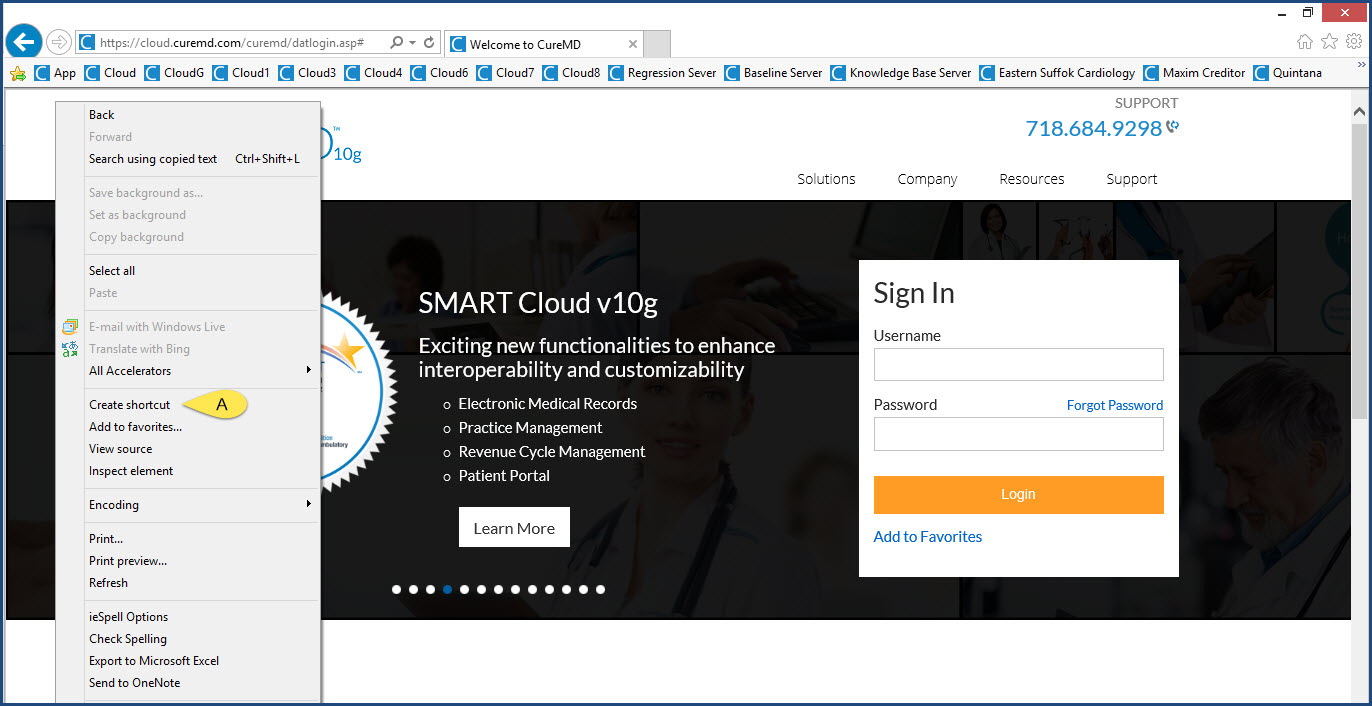
To begin, open your web browser and navigate to the official CureMD login page. You can find it by visiting the website at https://www.curemd.com. If you are a new user, you will need to create an account first. However, if you already have a CureMD provider login, simply enter your credentials.
Step 2: Enter Your Login Credentials
To access your CureMD provider login, you’ll need to enter your username and password. These credentials should have been provided to you when you registered with CureMD. If you don’t remember your credentials, use the forgot password link to reset them.
Step 3: Navigate the Dashboard
Once logged in, you’ll be directed to the CureMD provider portal dashboard. Here, you can access various features such as your patient records, medical billing information, and practice management tools. The user-friendly interface ensures that you can find everything you need in just a few clicks.
Step 4: Log Out Securely
After you’re done using the CureMD provider login, it’s important to log out securely. This will help protect your account from unauthorized access. To log out, simply click on the logout button located in the upper right corner of the dashboard.
Common Issues with CureMD Provider Login and How to Troubleshoot Them
Even though CureMD is designed to be user-friendly, you may encounter some issues while trying to access your CureMD provider login. Here are some of the most common problems and their solutions:
1. Forgotten Password
One of the most common issues that users face when trying to access their CureMD provider login is a forgotten password. If you find yourself in this situation, don’t panic. Simply click on the forgot password link on the login page, and follow the prompts to reset your password via email.
2. Incorrect Username
Another issue users often face is entering an incorrect username. Ensure that you are using the correct username associated with your CureMD provider login. If you’re unsure, check your registration details or contact CureMD support for assistance.
3. Browser Compatibility Issues
In some cases, CureMD provider login may not work well on all browsers. If you encounter issues logging in, try switching to another browser like Google Chrome or Mozilla Firefox. Ensure that your browser is updated to the latest version for optimal performance.
4. Connectivity Problems
If you are experiencing difficulty logging in due to slow or unstable internet connections, check your network settings or switch to a more reliable Wi-Fi network. Slow internet speeds can cause delays in loading the CureMD provider portal.
5. Account Lockout
After several unsuccessful login attempts, your CureMD provider login may become temporarily locked for security purposes. If this happens, wait for a few minutes before trying again. If the issue persists, contact CureMD customer support to unlock your account.
Why CureMD Provider Login is Crucial for Healthcare Providers
For healthcare providers, efficient medical billing is crucial for smooth practice operations. CureMD offers a streamlined system for managing patient data and medical billing processes, including claims submission, payment posting, and patient billing. By logging in to your CureMD provider login, you can:
-
Track your patient’s health information in one place
-
Submit insurance claims electronically
-
Monitor reimbursements and payments from insurance companies
-
Access detailed billing reports to ensure financial accuracy
These features save valuable time and reduce administrative overhead, allowing healthcare providers to focus more on patient care and less on paperwork.
How Icon Billing LLC Can Assist with Your CureMD Provider Login
As a leading medical billing service provider, Icon Billing LLC specializes in helping healthcare providers optimize their billing practices. We work closely with the CureMD platform to ensure seamless integration between your practice management software and billing systems. Whether you need help with the CureMD provider login or want to streamline your medical billing processes, our team of experts is here to assist you.
How to Integrate CureMD with Your Practice Management System
To make the most out of CureMD, it’s essential to integrate it with your practice management system. This integration ensures that all of your patient data, appointment schedules, and billing information are in sync. Icon Billing LLC provides comprehensive support for integrating CureMD with your existing systems, ensuring that your practice runs smoothly and efficiently.
Final Thoughts: Seamless Access with CureMD Provider Login
Having quick and easy access to your CureMD provider login is crucial for managing your healthcare practice effectively. By following the simple steps outlined above, you can log into your CureMD account with ease and start enjoying the platform’s numerous benefits.
At Icon Billing LLC, we understand how important it is for healthcare providers to stay organized and efficient. Our team is here to support you with CureMD login assistance, medical billing services, and practice management tools. If you encounter any issues with CureMD provider login, don’t hesitate to reach out to our expert team for help.
By using the CureMD provider login, you are unlocking the full potential of the CureMD platform, giving you the tools you need to run your practice more efficiently and effectively. We hope this guide has helped you understand the login process and troubleshoot any issues you may encounter. Whether you’re a new user or an experienced one, CureMD provider login offers the accessibility and convenience you need to enhance your practice management.